Guida Setup Streaming Budget: Vai in Live su Twitch/YouTube Sotto i 100$
Non serve un setup da 2000$ per andare in live su Twitch. Nel 2026, attrezzatura economica offre qualità sorprendente per meno di 100$.
Priority 1: Audio — USB Microphone
Audio quality matters more than video. Viewers forgive a grainy webcam but will leave if your audio is echoey or quiet. USB condenser microphones cost $10-25 on AliExpress and sound professional. Look for a cardioid pickup pattern (rejects background noise), a pop filter, and a desk stand. Dynamic USB mics are better if your room is noisy (no echo/reverb). Start with a USB mic before buying anything else.
The picks from this guide
Live AliExpress prices, quality-filtered.
 -13%
-13%AmpliGame by FIFINE Microfono da gioco USB RGB con muto touch leggero, microfono a condensatore con treppiede per PC, PS4/5, laptop Streaming-A2

10 13 pollici Ring Light dimmerabile Selfie Lamp Pptional treppiede illuminazione fotografica Studio Video luci per Live Make Up Youtube

Webcam Full HD 1080P con Microfono Integrato - Telecamera USB con Autofocus per PC e Laptop, Ideale per Registrazione Video e Videoconferenze

Scheda di acquisizione video USB 3.0 4K 30HZ Videoregistratore live HD compatibile HDMI Grabber per PC PS4 OBS Registrazione di giochi Microfono audio per giochi
Priority 2: Lighting — Ring Light
Good lighting transforms any webcam into a decent-looking stream. A 10-inch ring light with tripod costs $12-20 on AliExpress and includes dimmable brightness and color temperature (warm/cool/natural). Place it at eye level, slightly in front of you. The ring shape creates a flattering catchlight in your eyes. For a two-light setup, add a small softbox as fill light ($20-30).
Priority 3: Video — Webcam or Phone Camera
A 1080p webcam from AliExpress ($15-30) is fine for starting. Look for one with autofocus and a built-in microphone as backup. For better quality, use your phone as a webcam via IVCam or DroidCam (free) with a phone tripod ($5-10). Phone cameras are dramatically better than budget webcams. If using a phone, get a long USB cable for stable connection.
Priority 4: Capture Card (Console Streamers)
If you stream console gameplay (PS5, Xbox, Switch), you need a capture card. AliExpress HDMI capture cards ($10-20) support 1080p60 with USB 3.0. They work with OBS and Streamlabs. For PC gaming, you don't need a capture card — use OBS directly to capture your screen. High-end capture cards (Elgato, $150+) offer lower latency, but budget cards work fine for starting.
Priority 5: Software & Accessories
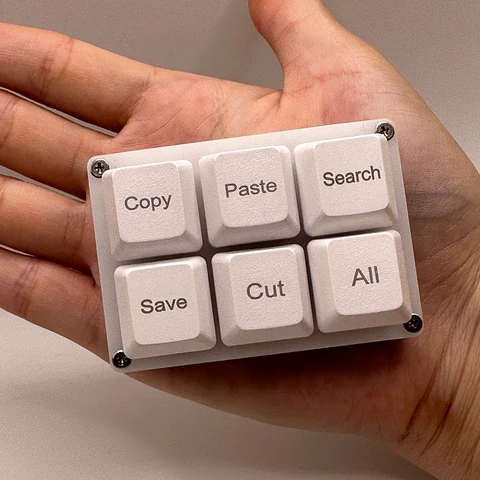
OBS Studio is free and industry-standard. Streamlabs OBS is easier for beginners. For alerts and overlays, use StreamElements or OWN3D (free tiers available). Add a stream deck alternative — a macro keypad ($10-20) lets you switch scenes, mute, and play sounds with one button. A RGB LED strip behind your monitor ($5-10) adds ambiance. Total software cost: $0.
FAQ
Can I stream with just a laptop and no extra gear?
Yes — OBS captures your laptop's webcam and screen. But the built-in mic will sound bad and the webcam is dim. A $15 USB microphone and $15 ring light are the minimum upgrades that make a dramatic difference. Budget $30-40 for the essentials.
What internet speed do I need for streaming?
For 1080p30 streaming: 6 Mbps upload minimum. For 720p30: 3 Mbps. Twitch recommends 4500-6000 Kbps bitrate. Most ISPs can handle this. Check your speed at speedtest.net. If upload is below 5 Mbps, stream at 720p — it still looks good.
Do I need a gaming PC to stream?
For console streaming, any laptop with 8GB RAM and USB 3.0 works — the console does the gaming. For PC streaming, you need a dedicated GPU (GTX 1660 or better) to avoid lag. NVIDIA NVENC encoder (GTX 1060+) handles streaming with minimal performance impact.
The picks from this guide
Live AliExpress prices, quality-filtered.
-13%AmpliGame by FIFINE Microfono da gioco USB RGB con muto touch leggero, microfono a condensatore con treppiede per PC, PS4/5, laptop Streaming-A2
10 13 pollici Ring Light dimmerabile Selfie Lamp Pptional treppiede illuminazione fotografica Studio Video luci per Live Make Up Youtube
Webcam Full HD 1080P con Microfono Integrato - Telecamera USB con Autofocus per PC e Laptop, Ideale per Registrazione Video e Videoconferenze