Guide Setup Streaming Budget: Devenir Streamer pour Moins de 100€
Vous n'avez pas besoin d'un setup à 2000€ pour streamer. En 2026, du matériel économique donne une qualité surprenante pour moins de 100€.
Priority 1: Audio — USB Microphone
Audio quality matters more than video. Viewers forgive a grainy webcam but will leave if your audio is echoey or quiet. USB condenser microphones cost $10-25 on AliExpress and sound professional. Look for a cardioid pickup pattern (rejects background noise), a pop filter, and a desk stand. Dynamic USB mics are better if your room is noisy (no echo/reverb). Start with a USB mic before buying anything else.
The picks from this guide
Live AliExpress prices, quality-filtered.

AmpliGame par FIFINE RGB USB Microphone de jeu avec sourdine tactile, micro à condensateur avec trépied pour PC, PS4/5, ordinateur portable Streaming-A2

Anneau lumineux à intensité variable avec trépied, lampe à selfie, éclairage photographique, studio vidéo, maquillage en direct, YouTube, 10 ", 13"

Webcam Full HD 1080P avec microphone intégré - Caméra USB à mise au point automatique pour PC portable, idéale pour l'enregistrement vidéo et les conférences
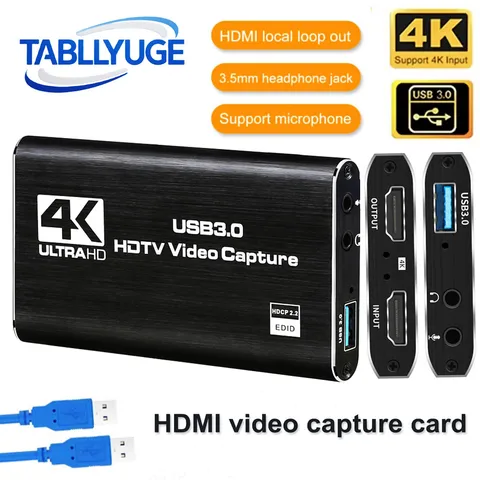
TABLLYUGE 4K USB 3.0 HDTV carte d'acquisition vidéo compatible HDMI enregistreur vidéo Grabber pour PC PS4 OBS enregistrement de jeu Audio micro
Priority 2: Lighting — Ring Light
Good lighting transforms any webcam into a decent-looking stream. A 10-inch ring light with tripod costs $12-20 on AliExpress and includes dimmable brightness and color temperature (warm/cool/natural). Place it at eye level, slightly in front of you. The ring shape creates a flattering catchlight in your eyes. For a two-light setup, add a small softbox as fill light ($20-30).
Priority 3: Video — Webcam or Phone Camera
A 1080p webcam from AliExpress ($15-30) is fine for starting. Look for one with autofocus and a built-in microphone as backup. For better quality, use your phone as a webcam via IVCam or DroidCam (free) with a phone tripod ($5-10). Phone cameras are dramatically better than budget webcams. If using a phone, get a long USB cable for stable connection.
Priority 4: Capture Card (Console Streamers)
If you stream console gameplay (PS5, Xbox, Switch), you need a capture card. AliExpress HDMI capture cards ($10-20) support 1080p60 with USB 3.0. They work with OBS and Streamlabs. For PC gaming, you don't need a capture card — use OBS directly to capture your screen. High-end capture cards (Elgato, $150+) offer lower latency, but budget cards work fine for starting.
Priority 5: Software & Accessories
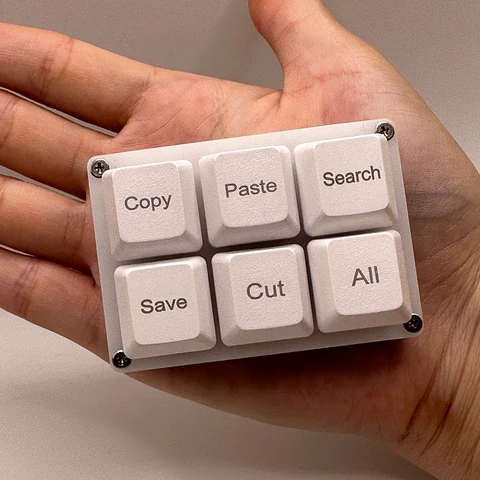
OBS Studio is free and industry-standard. Streamlabs OBS is easier for beginners. For alerts and overlays, use StreamElements or OWN3D (free tiers available). Add a stream deck alternative — a macro keypad ($10-20) lets you switch scenes, mute, and play sounds with one button. A RGB LED strip behind your monitor ($5-10) adds ambiance. Total software cost: $0.
FAQ
Can I stream with just a laptop and no extra gear?
Yes — OBS captures your laptop's webcam and screen. But the built-in mic will sound bad and the webcam is dim. A $15 USB microphone and $15 ring light are the minimum upgrades that make a dramatic difference. Budget $30-40 for the essentials.
What internet speed do I need for streaming?
For 1080p30 streaming: 6 Mbps upload minimum. For 720p30: 3 Mbps. Twitch recommends 4500-6000 Kbps bitrate. Most ISPs can handle this. Check your speed at speedtest.net. If upload is below 5 Mbps, stream at 720p — it still looks good.
Do I need a gaming PC to stream?
For console streaming, any laptop with 8GB RAM and USB 3.0 works — the console does the gaming. For PC streaming, you need a dedicated GPU (GTX 1660 or better) to avoid lag. NVIDIA NVENC encoder (GTX 1060+) handles streaming with minimal performance impact.
The picks from this guide
Live AliExpress prices, quality-filtered.
AmpliGame par FIFINE RGB USB Microphone de jeu avec sourdine tactile, micro à condensateur avec trépied pour PC, PS4/5, ordinateur portable Streaming-A2
Anneau lumineux à intensité variable avec trépied, lampe à selfie, éclairage photographique, studio vidéo, maquillage en direct, YouTube, 10 ", 13"
Webcam Full HD 1080P avec microphone intégré - Caméra USB à mise au point automatique pour PC portable, idéale pour l'enregistrement vidéo et les conférences